Baby Zone for Toddler & Parent
- 4.5
- Rating
- 100.00K
- Installs
- Free
- Price

 Analysis by App-foxy
Baby Zone for Toddler & Parent is the kind of parenting app that makes sense the moment you need both hands for something else. I tested it as a focused phone activity for a young child, and its central idea is simple: turn a locked phone into a small, contained space where a toddler can tap, watch, explore, and practise coordination without immediately wandering into other apps. That narrow purpose is also its biggest strength. It does not try to become a complete parenting platform, a learning curriculum, or a replacement for shared play.
Developed by VRSeeds, this free parenting app is aimed at families with young children and carries an Everyone content rating. It has been available since October 19, 2017, and the current version is 1.56. The app has built a solid audience, with more than one hundred thousand installs and an average rating of four and a half from roughly one thousand two hundred ratings. Those figures suggest that the basic idea has connected with many parents, but they do not remove the need to look at how it fits into daily life after the first burst of novelty.
What the first week feels like
The first few uses are appealing because the app solves an immediate household problem rather than asking a parent to learn a complicated system. A toddler can interact with the phone in a more controlled setting, while the adult gets a short window to prepare food, answer a message, pack a bag, or finish a small task. That practical usefulness is more important here than visual sophistication. I found the concept easiest to appreciate during transitions, when a child is restless but the family is not ready for a full activity.
You May Also Like

 Blood Strike: 2.5 Anniversary
Blood Strike’s Loadouts Turn Every Drop Into a Tactical Gamble
A close look at Blood Strike’s custom loadouts: how fast access to signature weapons reshapes its battle royale rhythm, rewards preparation, and narrows the gap between fights.

 Pandora - Music & Podcasts
Pandora’s Music Is Easy to Start, but Harder to Recover
Pandora’s strength is its low-effort path from a seed to a station. Its weak spot is how much confidence it asks you to place in connection, setup, and quiet recovery.

 8 Ball Pool
 Is Built on Rivalries, Rematches, and Routine
A close look at the rivalries, rematches, shared routines, and unanswered safety questions that turn a quick pool match into a persistent mobile community.

 Samsung Music
’s Quiet Strength Is Playing What You Already Own
Its reach comes less from spectacle than from dependable access to a personal library. That simplicity is both the app’s strongest retention engine and its ceiling.

 AccuWeather: Weather Radar
AccuWeather Review: A Quick, Clear Forecast for Everyday Decisions
For everyday plans, the best forecast is the one you can understand quickly. AccuWeather makes rain timing, radar, and local conditions easy to act on, with a few trade-offs.

 Hill Climb Racing
Why Hill Climb Racing Still Turns Crashes Into One More Run
A tiny car, a bumpy hill and one more upgrade: Hill Climb Racing keeps resurfacing because its simple chaos makes every near-miss feel personal.
More From Our News Desk



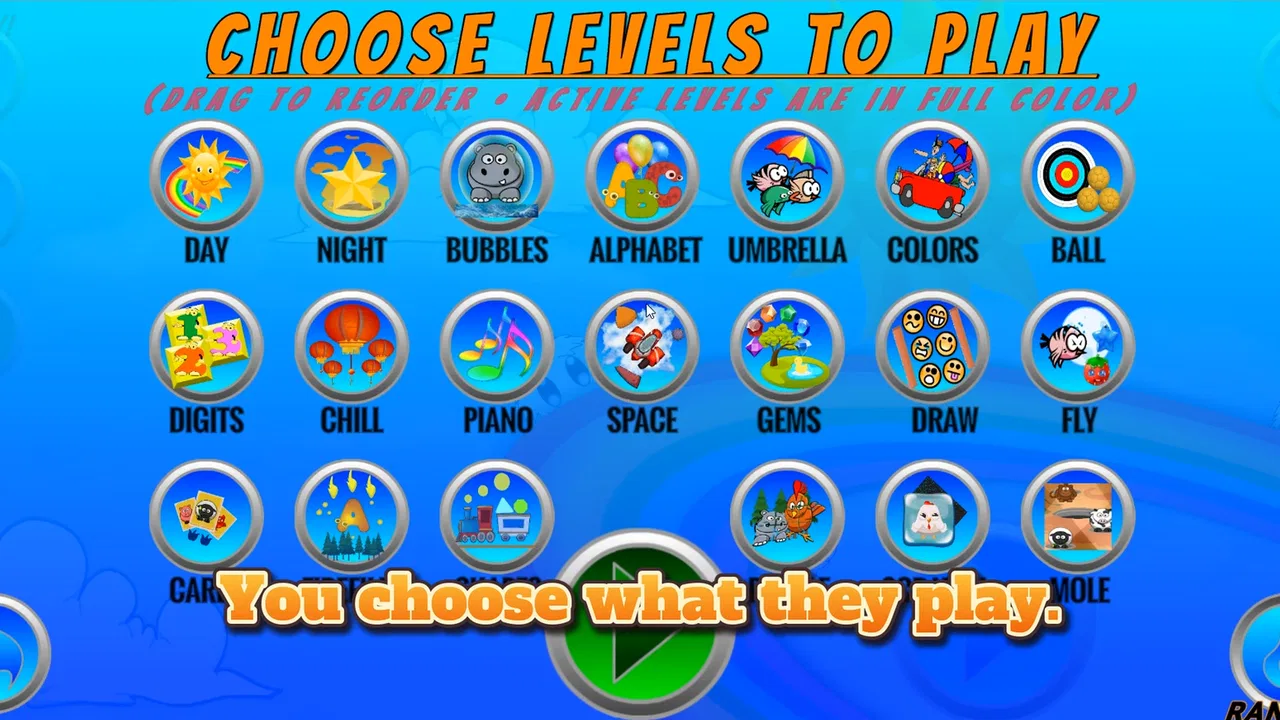
The phrase “lock phone” should be understood as the heart of the experience: the phone becomes dedicated to Baby Zone instead of acting like an open doorway to everything else on the device. For a parent, that changes the risk of handing over a phone. You are not simply giving a toddler your normal screen and hoping they stay in one place. You are creating a more deliberate boundary around the session, which is particularly helpful for children who instinctively press navigation buttons or swipe toward familiar icons.
During the first week, the attraction comes from immediate cause and effect. Tapping, dragging, and watching something respond can hold attention while also encouraging basic hand-eye coordination. The learning value is modest and practical rather than academic. I would describe it as an early interaction exercise, not a structured lesson in letters, numbers, or language. That distinction matters when deciding whether it belongs in your child’s routine.
A useful way to introduce it is to keep the first session short and sit nearby. Let the child discover the response of the screen without turning the app into a reward for every difficult moment. I also recommend testing the locking behavior yourself before handing over the device. Toddlers vary widely in how forcefully they tap, how quickly they swipe, and how determinedly they search for an exit. A parent who understands the controls can avoid interrupting the activity to troubleshoot in front of an impatient child.
A realistic everyday use
Imagine a parent preparing breakfast while a toddler has finished eating but is not ready to move on. Baby Zone can fill that awkward gap more effectively than handing over a phone with a video platform open. The child has something responsive to do, and the adult can remain close enough to supervise. In this situation, the app works because it is a short bridge between activities, not because it replaces conversation, toys, or outdoor movement.
The same approach can help during a waiting period at home or while getting ready to leave. I would be cautious about making it the default solution whenever a child complains, though. If every transition ends with a phone, the app may become associated less with exploration and more with automatic soothing. Its first-week appeal is real, but the parent still controls whether that appeal becomes a useful tool or a habit that is difficult to interrupt.
Where it differs from familiar alternatives
The usual alternatives are cartoons, general toddler games, physical toys, or simply giving a child an unlocked phone. Baby Zone sits between those options. Compared with a passive video, it asks the child to interact, which can make a short session feel more engaging. Compared with a broad collection of toddler games, its value is the contained phone experience rather than a large menu of separate activities. Compared with a toy, it is convenient because many families already have a compatible device nearby, although it cannot provide the tactile variety or movement of real objects.
That comparison also reveals its limits. A child who needs active movement, sensory play, or sustained social interaction will probably get more from blocks, drawing materials, music, or a parent-led game. A child who is ready for deliberate early-learning content may be better served by an app designed around a clear progression in language, counting, or problem-solving. Baby Zone is strongest when the goal is safe, simple screen interaction with a toddler, not when the goal is a complete educational program.
What remains useful after the novelty fades
The important question is not whether a toddler enjoys the first few sessions. Most new screen activities can achieve that. The better question is whether Baby Zone continues to earn a place in the family’s routine once the child has seen the same style of interaction several times. In my experience, its recurring value depends on the parent using it as a dependable tool for specific situations rather than expecting endless entertainment.
Its strongest long-term role is as a predictable transition activity. For example, a family might reserve it for getting dressed, preparing a meal, or handling a short period when the adult must concentrate. The app becomes easier to manage when the child knows that it appears for a particular reason and ends when that task is finished. This is more sustainable than offering it randomly throughout the day, because the parent can explain the pattern and keep the session connected to a real household need.
Another lasting benefit is the reduction of accidental phone exploration. Toddlers often treat a smartphone as a collection of mysterious buttons, and an unlocked device can lead to unwanted calls, changed settings, or unrelated content. A dedicated child-focused screen reduces that kind of wandering. It does not turn the phone into a toy that is automatically suitable for every child, but it gives the adult a clearer starting point than the normal home screen.
I also noticed a useful trade-off in the app’s simplicity. Because it is not trying to be a large learning library, there is less pressure to keep selecting new lessons or comparing progress. That can be a relief for parents who want a low-maintenance option. On the other hand, simplicity means the app may stop feeling fresh sooner for children who need frequent changes. Its recurring value comes from reliability and convenience, not from a deep content journey.
Three ways to get more value from it
Use it as a transition cue instead of an emergency distraction. Start the activity when a predictable household task begins, and end it when that task is complete. This makes the app easier to explain and reduces the chance that the child sees it as the answer to every moment of boredom.
Pair screen time with an offline follow-up. If the app encourages tapping or coordination, place a simple physical activity nearby afterward, such as stacking objects, turning pages, or drawing. The screen session then becomes one small part of a broader play pattern rather than the whole activity.
Keep the device prepared before the child needs it. Check the battery, open the app, and confirm the phone is in the intended locked state ahead of time. This small routine prevents the common failure where a parent hands over the device in a hurry and then has to take it back moments later.
These habits also answer a question many parents have: can it be used without constant technical attention? Usually, that is the point of the focused design, but supervision still matters. The app can limit what happens on the phone; it cannot judge whether the child is tired, overstimulated, frustrated, or ready for a different kind of play. I would remain physically aware of the child, especially during the first several sessions and whenever the device is being used outside the home.
The maintenance burden in real family life
Baby Zone is relatively light to maintain because its purpose is narrow. There is no need to build a profile, organise a course, or keep up with a complicated calendar. The main maintenance is behavioral: deciding when it is appropriate, remembering to end the session, and keeping the phone ready. For busy parents, that is a meaningful advantage over apps that demand regular setup or adult participation before a child can begin.
There is also a financial detail worth considering. The app is free to download, but it includes in-app purchases ranging from ninety-nine cents to four dollars and sixteen cents per item. I would not treat the free entry point as the whole cost question. Before relying on it, check which parts of the experience are available without payment and whether the paid items add something your child will use repeatedly. A purchase only makes sense if it reduces friction over time, rather than briefly restoring the excitement of a familiar activity.
Because the current version is 1.56 and the app has been around for several years, families using an older device should pay attention to compatibility. The minimum operating system is Android 7.0, so an older Android phone may not be suitable. This is especially relevant if you plan to give a child a spare device rather than your everyday phone. Test the app on that specific device, since a setup that works on a newer handset may not feel equally smooth on older hardware.
The maintenance burden also includes cleaning and handling the device itself. Toddlers tap with sticky fingers, press hard, and may drop whatever they are holding. A case and a screen protector are sensible practical precautions, although they are not substitutes for supervision. I would avoid using the app near food or water, not because Baby Zone requires special treatment, but because the phone is still a valuable household device even when it is being used as a child activity.
Where parents may feel friction
The first source of fatigue is repetition. A child may enjoy the interaction intensely at first and then ask for something new. When that happens, the app cannot solve the problem by itself. You may need to switch to a toy, a book, music, or a different activity. Parents looking for a deep catalogue of changing content may find the experience too limited, especially if their child is already comfortable with more elaborate educational apps.
The second source is the end of the session. A locked, engaging phone can make stopping feel more difficult than starting. I found it better to give a clear warning and connect the ending to the household task: breakfast is ready, shoes are going on, or the parent has finished preparing something. If the app is used whenever the child is upset, taking it away can become a negotiation. That is a routine issue rather than a flaw unique to Baby Zone, but the app’s convenience can make overuse tempting.
The third source is the gap between coordination practice and genuine learning. Tapping and responding can be useful, but parents should not mistake that interaction for a full developmental plan. If your priority is phonics, counting, vocabulary, drawing technique, or guided problem-solving, another carefully chosen app may be a better fit. Baby Zone earns its place through controlled access and simple engagement, not through a broad educational sequence.
There is also a social limitation. A toddler may be occupied, but the app does not replace a parent talking, pointing, singing, or responding to the child. I would be particularly cautious about using it during moments when the child is actually seeking connection. Sometimes the fastest way to settle a situation is not another screen activity but a short conversation, a cuddle, or a change of environment.
Who should keep it and who should skip it
I think Baby Zone is a good match for a parent who wants a focused, free starting point for occasional toddler phone use. It is especially suitable when the practical need is to prevent wandering through an unlocked device while offering a simple interactive activity. Families with a spare Android phone may find it useful as a dedicated, prepared option, provided that device meets the Android 7.0 minimum.
It is less suitable for parents who want detailed progress tracking, a long sequence of lessons, rich creative tools, or a large rotating catalogue. It is also a poor choice if the family’s main concern is reducing screen use altogether; a locking feature can make phone use more controlled, but it does not make screen time disappear. In that case, physical play materials and shared activities are the more appropriate default.
Parents should also consider the child’s temperament. A toddler who enjoys quick visual responses may settle into the app comfortably. A child who becomes distressed when a screen ends, presses aggressively, or loses interest in repetitive interactions may create more work than the app saves. Start with a short, supervised trial and judge the aftermath as carefully as the session itself. If the child returns calmly to another activity, the app may be serving its purpose. If every use creates a struggle, it is not earning its place.
My long-term verdict
After the first-week excitement, Baby Zone for Toddler & Parent still makes sense, but only in a clearly defined role. I would keep it as a backup for transitions and brief practical moments, not as a main source of entertainment or education. Its best feature is the boundary it creates around a toddler’s phone interaction, combined with enough tapping and response to feel more active than simply watching a video.
The app’s free price makes it easy to try, while the Everyone rating keeps its intended audience broad. The optional purchases, compatibility requirement, and possibility of repetition mean that parents should test the actual routine before spending money or building the day around it. VRSeeds has made something useful by staying focused, but that focus also means the app cannot grow with every child or meet every developmental need.
My recommendation is to treat Baby Zone as a small household tool, not a digital babysitter. Prepare it before you need it, use it for a specific transition, stay aware of the child, and follow the screen session with something offline. If that pattern reduces phone-related stress without taking over your family’s routine, the app has lasting value. If you are searching for a rich educational path or a replacement for hands-on play, choose a different option. For the right moment and the right expectations, though, this simple parenting app earns a practical place on a family device.
In short, I would recommend trying Baby Zone for Toddler & Parent to parents who want controlled, occasional toddler interaction on Android. Its lasting appeal is not endless novelty; it is the repeatable convenience of handing over a prepared phone without opening the rest of the device. That is a modest promise, but when used thoughtfully, it is one the app can genuinely keep.
FAQs for Baby Zone for Toddler & Parent
01What is Baby Zone for Toddler & Parent?
Baby Zone for Toddler & Parent is a family-focused app designed to support parents and young children with age-appropriate activities, learning content, and everyday parenting resources. Its features may help toddlers explore basic concepts through playful interaction while giving parents ideas for routines, entertainment, and development. Before downloading, parents should review the listed age range and available content to confirm that it suits their child’s needs.
02Is Baby Zone suitable for my toddler’s age and development level?
The app is generally intended for toddlers and their parents, but suitability can vary depending on a child’s age, language ability, attention span, and developmental stage. Some activities may be easier for younger children, while others could be more appropriate for older toddlers. Parents should explore the description, screenshots, and in-app categories before use, and always supervise children when introducing new digital content.
03Does Baby Zone for Toddler & Parent require an internet connection?
Internet requirements can depend on the specific feature being used. Basic sections or previously loaded activities may work without a constant connection, while streaming content, updates, account features, or additional resources may require Wi-Fi or mobile data. To avoid unexpected data usage, parents should test the app at home first and check whether content can be accessed offline before relying on it during travel.
04Is Baby Zone safe for children to use?
Baby Zone is designed for use by toddlers and parents, but no children’s app should replace adult supervision. Parents should check the app’s privacy policy, permissions, advertising practices, and any external links before allowing independent use. It is also sensible to enable device parental controls, disable purchases where possible, and verify that the displayed content remains appropriate for the child’s age and family preferences.
05Is Baby Zone for Toddler & Parent free to download?
The app’s download price and available features may differ between Android and iOS, and some versions may include optional purchases, subscriptions, or premium content. Parents should check the current store listing carefully before installing, especially the in-app purchase section and subscription terms. If a child uses the device, activate purchase restrictions and require parental approval so accidental charges are less likely.
Pros
- Simple activities help toddlers practice early learning skills.
- Parent-friendly design makes it easy to choose age-appropriate content.
- Bright visuals and gentle interactions are engaging for young children.
- Useful for short
- supervised learning sessions at home or on the go.
- Offers a calmer alternative to fast-paced entertainment apps.
Cons
- Some activities may feel repetitive after frequent use.
- The app may require parental guidance for younger toddlers.
- Limited content can reduce its long-term replay value.
- Certain features or activities may depend on in-app purchases.
- Performance may vary on older Android or iOS devices.

Baby Zone for Toddler & Parent
Gallery